ContextCleaner: see every entry in the Windows 11 right-click menu, and which app added it — on the Microsoft Store.
Coming soon for Windows Updated 2026-10-15

Turn a spec book into a cited submittal register, on this PC.

Spec Register Builder is an upcoming Windows app from Automata Labs that reads a construction spec book PDF and builds the submittal register from it: every requirement it finds, with its section, paragraph, and page. Review each row beside the rendered page, filter and sort by type or confidence, and export to Excel or CSV with columns that line up with common submittal logs. The PDF is only read, and nothing uploads.

Coming soon to the Microsoft Store · No payment is taken.

No spam. Be the first to know when we launch.

How it works See the screens

cited pages · twelve submittal types · xlsx and csv · sha-256 manifest · nothing uploads

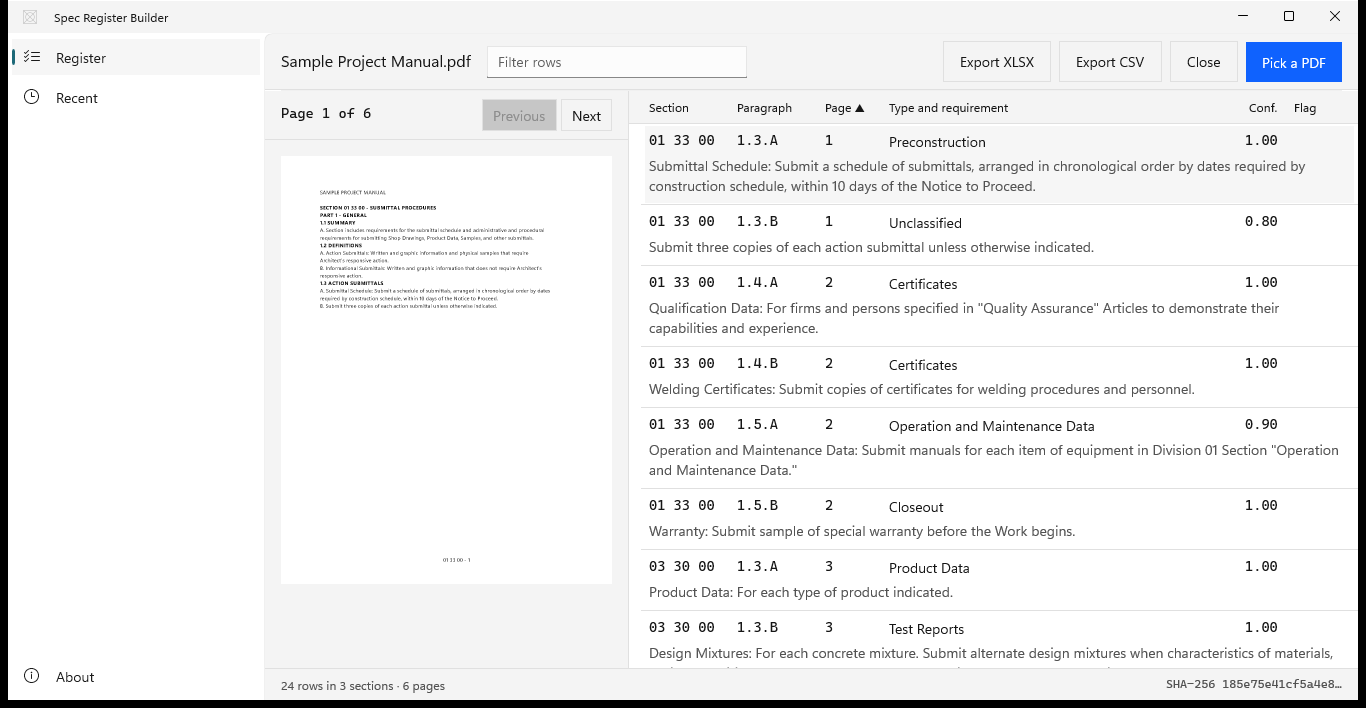
Spec Register Builder register beside the rendered page

Spec Register Builder with a sample project manual open: page 1 rendered on the left and the register on the right, listing rows from section 01 33 00 with paragraph, page, submittal type, and confidence.
Every row cites its section, paragraph, and page. Select a row and its page opens beside the table.

The problem

The project manual is hundreds of pages, and the submittal log is due first.

Every section carries its own submittal requirements: product data and shop drawings under Submittals, samples and qualifications under Quality Assurance, test reports under Field Quality Control, and warranties under Closeout. Building the log by hand means reading each section, typing every item into a spreadsheet, and noting the section and paragraph so someone can find it again. An item missed now turns up later, when the material is already on order.

With Spec Register Builder

Pick the PDF. Review the rows. Export.

Spec Register Builder reads the section number and title from each section’s first page, scans every article for submittal language, and lists each requirement with its part, article, paragraph, PDF page, printed page, type, and a confidence hint. The rendered page sits beside the table, so checking a row takes one click. When the register looks right, export it to Excel or CSV.

Key benefits

From spec book to submittal log, with every page cited

Every row cites its page

Each requirement carries its spec section and title, the part, the article, and the paragraph, such as 1.3.A or 1.4.B, plus the PDF page and the printed page from the section footer, such as 03 30 00 - 3. Select a row and its page opens beside the table, so anyone on the team can check the item against the book.

Sections read from the book itself

Numbers and titles come from the SECTION title line on each section’s first page: six-digit numbers such as 03 30 00, level-four numbers such as 31 62 13.13, and older five-digit numbers such as 03300.

Twelve submittal types

Shop Drawings, Product Data, Samples, Test Reports, Certificates, Closeout, Operation and Maintenance Data, and more, with Action, Informational, or Closeout taken from the article each row came from.

Filter, sort, and review

Type shop drawings or a section number to narrow the table, and sort by section, paragraph, page, type, or confidence. Rows with a low confidence hint carry a Review flag, so you know where to look first.

Excel and CSV, ready for the log

Fourteen columns that line up with common submittal logs, from Spec Section to Requirement Text, with Submit By, Reviewer, and Notes left blank for your team to fill in.

A manifest with the source hash

The workbook’s Manifest sheet records the source file name, its SHA-256, the page and row counts, the app version, and the export time, so anyone can tell which book a register came from.

Scanned and locked books open too

Pages without a text layer are read with the OCR built into Windows, and section numbers misread as letters are repaired. A password-protected PDF opens after you enter its password, and the file is never changed.

How it works

Pick, read, review, export

Pick

Choose Pick a PDF and select the spec book, or reopen one from Recent. A password-protected PDF asks for its password. For a first look, open the sample spec book that ships with the app.

Read

The app reads each SECTION title line, the parts, articles, and paragraphs under it, and every paragraph that asks for a submittal. Pages without a text layer are read with the OCR built into Windows.

Review

The register sits beside the rendered page. Select a row to open its page, type in Filter rows to narrow the table, and sort by section, paragraph, page, type, or confidence.

Export

Choose Export XLSX or Export CSV and name the file in the Save dialog. Every row goes into the export, whatever the filter shows, and the status line confirms the rows, sections, and pages saved.

Every row points to its page in the book, so the register you send is one anyone can trace back to the specification. See it on the screens.

See it in action

The book, the register, and the export

Spec Register Builder register for Sample Project Manual.pdf: 24 rows in 3 sections over 6 pages, with Preconstruction, Certificates, Operation and Maintenance Data, Closeout, and Product Data rows beside the rendered page.
The register beside the book. Each row shows the section, paragraph, page, submittal type, confidence, and the requirement text.
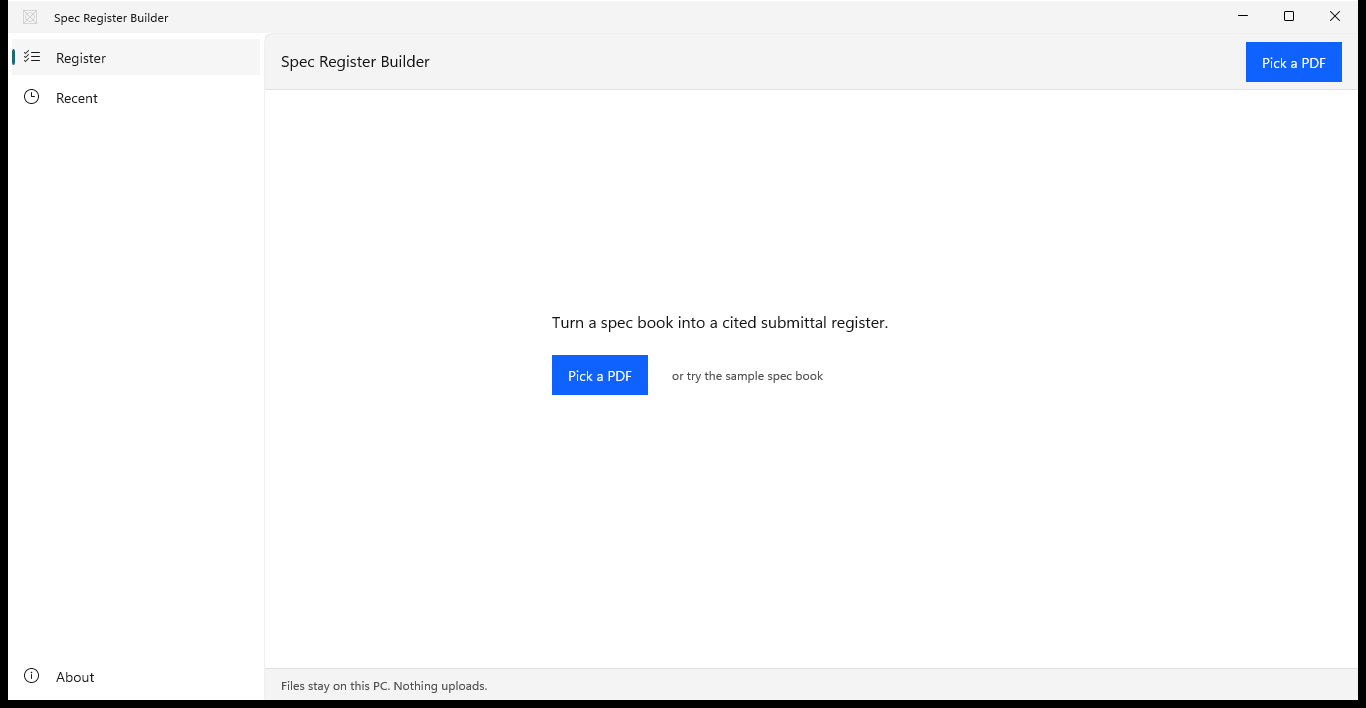
Spec Register Builder on first run, showing the sentence Turn a spec book into a cited submittal register, a Pick a PDF button, and a link to the sample spec book.
Open the app and pick a PDF. One sentence, one button, no account, no setup.
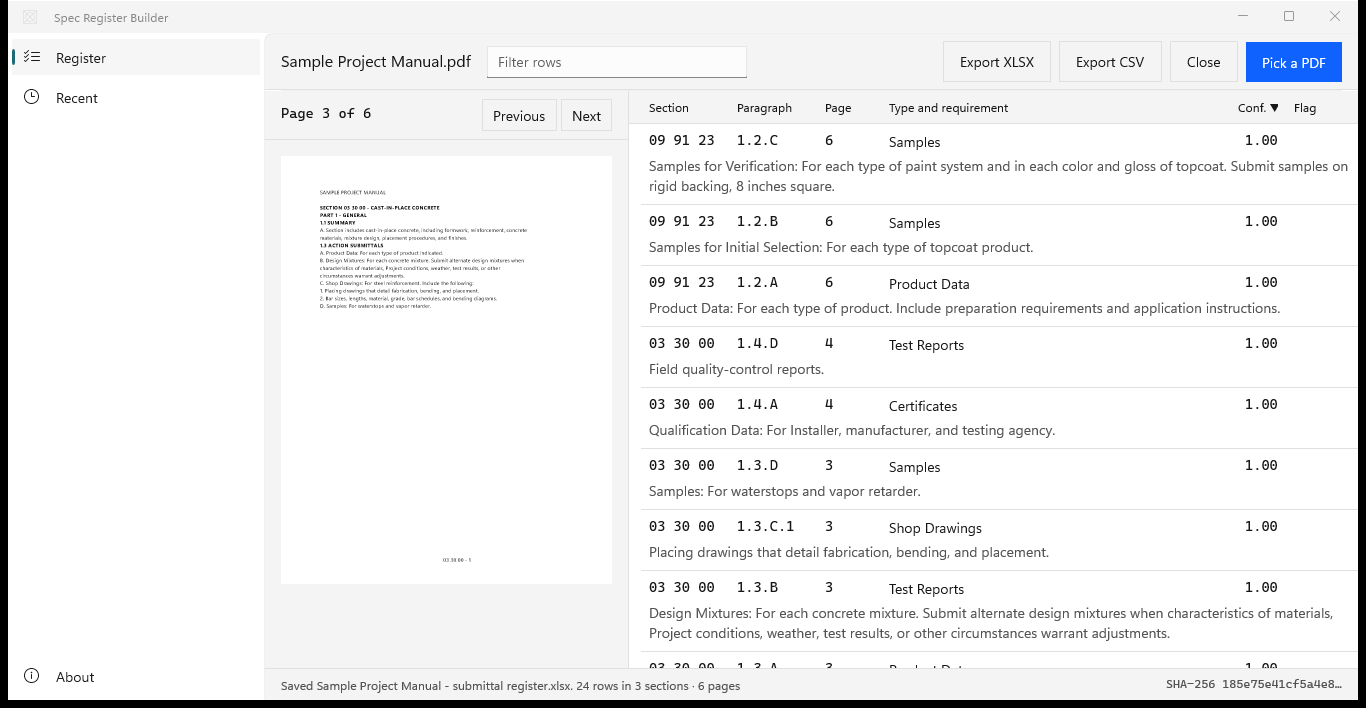
Spec Register Builder with the filter set to shop drawings, the table sorted by confidence ascending, and two Shop Drawings rows from section 03 30 00 on page 3.
Type shop drawings to filter the register, then sort by the confidence hint to see where to look first.
Spec Register Builder status line reading Saved Sample Project Manual - submittal register.xlsx, 24 rows in 3 sections, 6 pages, with the source file SHA-256 at the right of the status bar.
Export XLSX or CSV. The workbook carries a Manifest sheet with the source file’s SHA-256, page and row counts, app version, and export time.

Screenshots use a sample project manual generated for testing, with placeholder text. MasterFormat is a trademark of The Construction Specifications Institute, Inc. (CSI); Spec Register Builder is not affiliated with or endorsed by CSI.

Privacy

Nothing uploads

Spec Register Builder runs on your PC in the Windows app sandbox and declares no capabilities. It makes no network connections, has no account, and collects no telemetry. It reads only the PDF you pick, writes only the XLSX or CSV you name in the Save dialog, and never writes to the spec book itself.

Scanned pages are read by the OCR engine built into Windows, on this PC. The Recent list keeps up to 20 books you picked, and Forget releases one at once.

Feature preview

  • An Excel workbook with a Register sheet: a frozen header row, 14 columns, and page and confidence as numbers.
  • A Manifest sheet with the source file, its SHA-256, pages, sections, rows, app version, and export time.
  • A CSV in UTF-8 with a byte-order mark, so Excel opens it with accents intact.
  • Section, part, article, paragraph, PDF page, and printed page on every row.
  • Twelve submittal types and an Action/Info column, with G and Info on UFGS books.
  • Scanned pages read with the OCR built into Windows, named in the status line and the manifest.
  • Password-protected spec books opened with their password, read-only.
  • A bundled sample spec book, a Recent list of up to 20 books, and light, dark, and high-contrast themes.

Hear when Spec Register Builder launches.

Spec Register Builder is coming soon to the Microsoft Store for Windows. Join the waitlist for launch updates. No payment is taken.

Who it is for

  • General contractors and construction managers building the submittal register for a new project from the project manual PDF
  • Subcontractors listing the shop drawings, product data, samples, and closeout items their sections require, with the paragraph and page for each
  • Project engineers and coordinators preparing a cited submittal schedule in Excel for the preconstruction meeting
  • Contractors on federal projects working from UFGS specifications, with every SD item typed and every G item marked for Government approval

FAQ

Quick answers about Spec Register Builder

What is Spec Register Builder?

Spec Register Builder is an upcoming Windows app that turns a construction spec book PDF into a cited submittal register. It reads each section number and title from the book, lists every submittal requirement it finds with its paragraph and page, and exports the register to Excel or CSV, on your PC with nothing uploaded.

How do I build a submittal register with it?

Choose Pick a PDF and select the project manual. The register appears beside the rendered page. Filter and sort the rows, select one to open its page, then choose Export XLSX or Export CSV and name the file. The export is named after the book, such as Project Manual - submittal register.xlsx.

What columns are in the export?

Spec Section, Section Title, Part, Article, Paragraph, PDF Page, Printed Page, Requirement Text, Type, Action/Info, Confidence, Submit By, Reviewer, and Notes. Submit By, Reviewer, and Notes are left blank for your team. The XLSX adds a Manifest sheet with the source file’s SHA-256.

Which submittal types does it recognize?

Preconstruction, Shop Drawings, Product Data, Samples, Design Data, Test Reports, Certificates, Manufacturer’s Instructions, Manufacturer’s Field Reports, Operation and Maintenance Data, Closeout, and Sustainability. Each row also carries Action, Informational, or Closeout from its article, or G and Info on UFGS books.

Where in a section does it look for submittals?

In every article of every section, not only the Submittals article. Samples under Quality Assurance, test reports under Field Quality Control, and warranties under Closeout are listed too, and each row records the part and article it came from, such as Part 1, article 1.4.

Which section numbering does it read?

Six-digit MasterFormat numbers such as 03 30 00, level-four numbers such as 31 62 13.13, six digits run together, and older five-digit numbers such as 03300, from title lines like SECTION 03 30 00 - CAST-IN-PLACE CONCRETE. Printed pages come from footers such as 03 30 00 - 3 or Page 2 of 12.

What does the confidence number tell me?

It is a hint from 0 to 1 that shows where to look first. It weighs how directly the paragraph asks for a submittal, which article it sits in, whether a submittal type is named, and whether the sentence is complete. Rows at 0.40 or below carry a Review flag, and sorting by Conf. brings them to the top.

Can it read scanned or password-protected spec books?

Yes. Pages without a text layer are read with the OCR engine built into Windows, and the status line and the Manifest sheet name the pages read with OCR. A password-protected PDF asks for its password when you open it; type it and choose Open, and the file itself is not changed.

What happens to my original PDF?

It stays exactly as it was. The spec book is opened for reading only and is never written. Exports are new XLSX or CSV files you name in the Save dialog. Recent keeps access to up to 20 books you picked, and Forget releases one at once.

Where are my files processed?

On your PC. Spec Register Builder makes no network connections, has no account, and collects no telemetry. It runs in the Windows app sandbox with no declared capabilities, so it reaches only the PDF you pick and the file you save.

Is Spec Register Builder available now?

Spec Register Builder is coming soon to the Microsoft Store for Windows. Join the waitlist for launch updates. No payment is taken.

What Windows version do I need?

Windows 10 version 2004 or later, or Windows 11, on an x64 or ARM64 PC. Scanned pages are read with the OCR language installed in Windows. The window opens at 1100 by 720 and works down to 960 by 600.
Still stuck? Email [email protected] after checking the Support Center.

A spec book in. A cited submittal register out.

Spec Register Builder reads every section, lists each submittal requirement with its paragraph and page, and exports the register to Excel or CSV with the source file’s SHA-256. The PDF is never written, and nothing uploads.

No payment is taken.