Taskbar Sentinel: back up your pinned apps & restore your taskbar in one click — on the Microsoft Store.
Available on Windows

Stop losing track of time with a persistent timer HUD

Un-ignorable. Always on top. Not another tray icon you forget exists.

TimeFence is a persistent timer HUD for Windows: a countdown that sits where you work, not in the system tray. Optional Strict Mode turns a session into a real commitment—start a block and the easy pause path disappears on purpose.

Technical specs & purchase

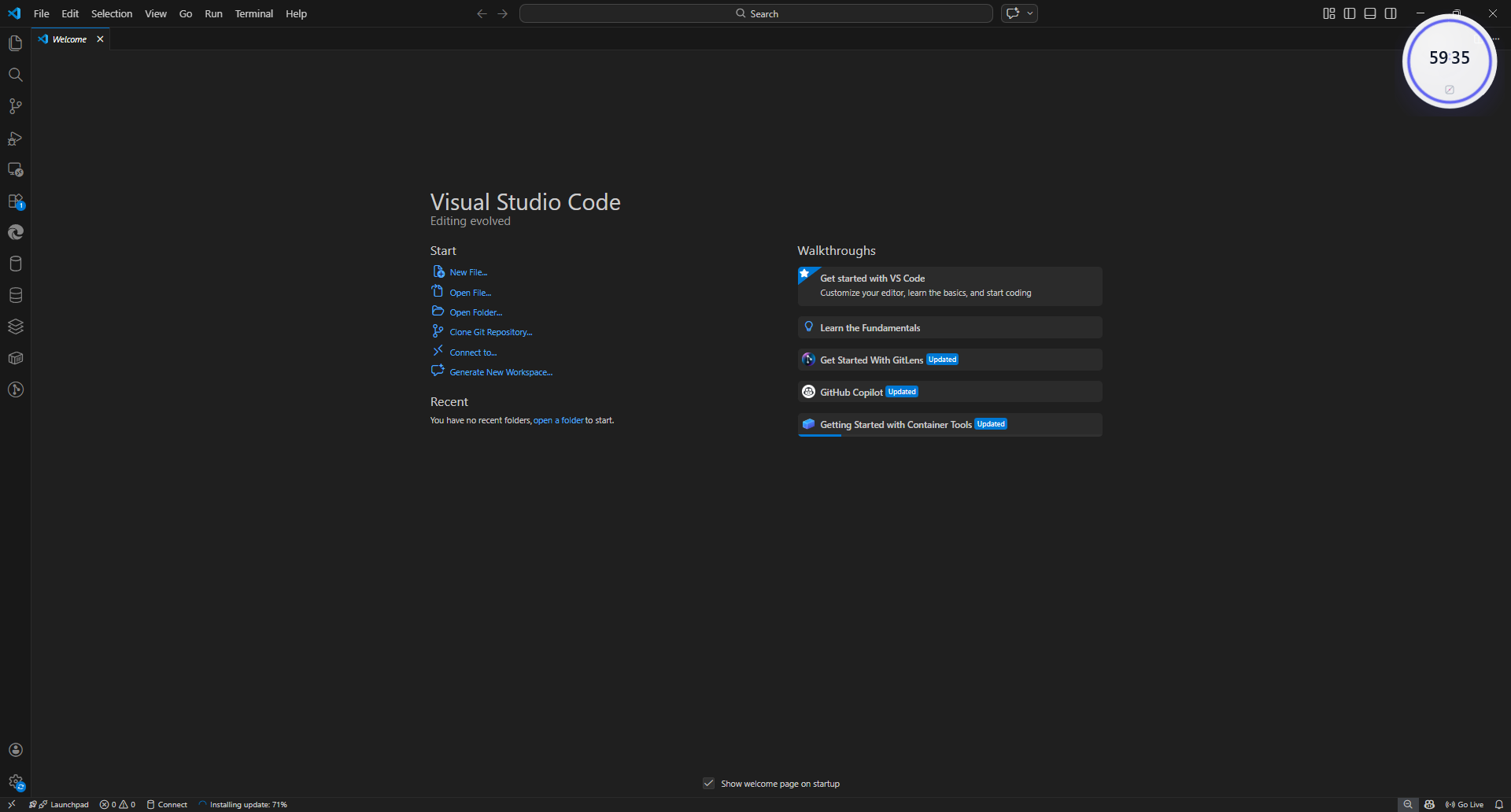
TimeFence always-on-top timer HUD visible over a desktop workspace, keeping the countdown in view while you work.

Always-on-top HUD over your workspace

Why tray timers fail

Out of sight, out of mind.

The system tray is where good intentions go to lose signal. You meant to check the timer—but your attention never collides with it, so the clock stops being a cue and becomes background noise. That is not discipline. That is UI hide-and-seek.

The HUD fix

Externalize time where your eyes already are.

TimeFence keeps the countdown in peripheral vision: a persistent visual cue for time management without the tab-hunt of another web Pomodoro or a “focus” app with a login wall. Time stays visible, not “somewhere in the taskbar if you remember to look.”
What you get

Overlay visibility, native performance, and optional hard enforcement.


TimeFence persistent timer HUD on a zero-latency overlay, staying visible over the desktop so the countdown stays in peripheral view.

Persistent timer HUD

Always-visible countdown on a zero-latency overlay—peripheral time you can't ignore, without modal chrome blocking your work.

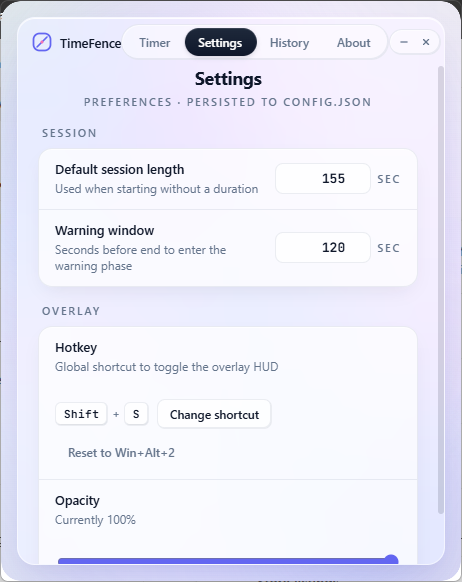
TimeFence settings screen with local configuration options for a Rust and Tauri desktop app—no web workflow required.

Local-first focus

No sign-in and no cloud session store. Your focus blocks stay on your machine.

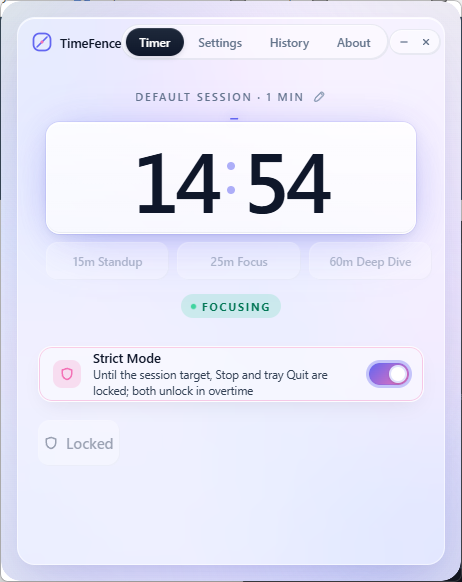
TimeFence Strict Mode dialog describing enforced sessions where pause and exit stay disabled until the focus block completes.

Strict Mode

A real enforcement switch. Start a block and the soft “I’ll just pause it” path disappears—on purpose. Use it when you mean it.

Use This When

  • Combat time blindness: keep a persistent visual timer HUD in view on Windows, not in the tray
  • Reduce context switching: stop tab-flipping to web timers or “focus” apps with account walls
  • When you need commitment, not cosplay: optional Strict Mode for deterministic focus sessions you cannot abandon mid-block

Where it fits

Tray, browser tab, or HUD. Pick the one you can actually see.


Tray-based timers

Fine if you have perfect check-in habits. For everyone else, they are easy to forget because the cue is not in your field of view when you are deep in an IDE or a doc.

Pomodoro in the browser

Another tab. Another place to get hijacked. You did not need more reasons to context-switch; you needed a clock that does not live inside a competing attention economy.

TimeFence

A local-first, persistent timer HUD for Windows with high-performance overlay behavior and optional Strict Mode when you want enforcement, not a sticker chart.

Practical guides for Pomodoro HUD workflows

Learn how TimeFence fits un-ignorable timers, loud alerts, offline desktop Pomodoro, web-app alternatives, privacy-first focus tools, deep-work sessions, and lightweight Rust/Tauri desktop utilities.

Browse TimeFence workflow guides or read TimeFence vs tray Pomodoro timers .

FAQ

Quick answers


Is Strict Mode really no exit?

When Strict Mode is enabled for a session, TimeFence is designed to remove pause and quit paths until the block completes—so the timer acts as a commitment device, not a gentle suggestion. Use it on purpose, for blocks you are willing to finish.

Does TimeFence send telemetry or require an account?

No. TimeFence is local-first, runs as a Tauri app on your machine, and does not use cloud sign-in for core functionality. You are not buying another account-based productivity app.

What does “zero–focus-steal” mean for the overlay?

The HUD stays visible so you can see the countdown without the app yanking keyboard focus or interrupting the window you are working in. You keep your flow; time stays externalized on screen.

Technical specifications

Facts for technical buyers

Spec Implementation
Data Sovereignty Focus sessions and HUD state remain on-device; no cloud session store
Telemetry Status None; no analytics or sign-in for core timer behavior
Core Runtime Rust / Tauri with native Windows overlay APIs
Network Requirements Fully functional offline
Deployment Compatibility Windows 10 and 11 via Microsoft Store and direct purchase
Overlay behavior Always-on-top HUD designed not to steal keyboard focus
Strict Mode Optional session lock with pause/quit paths disabled until block ends

Ready to stop arguing with a tray icon?

Get a persistent TimeFence HUD and optional Strict Mode with a one-time license on the Microsoft Store, or purchase through our site for $2.99 USD .

$2.99 USD — Perpetual License

One-time purchase · No subscription · Instant install via the Microsoft Store

Buy through the Microsoft Store—instant install, automatic updates, and a Microsoft receipt for easy expensing. No account needed on our site, and no subscription.