Taskbar Sentinel: back up your pinned apps & restore your taskbar in one click — on the Microsoft Store.
Available on Windows $4.99 USD

Keep Windows awake. Keep CPU overhead near zero.


StayGreen is the low-overhead keep-awake utility for professionals dealing with managed laptops, aggressive sleep policies, and presence-sensitive workflows.

Prevent sleep, keep your status active, and work with Windows power management without fake mouse movement or polling loops. StayGreen uses the Windows execution-state API, then adds smart thermal guardrails for real workstation use.

$4.99 USD — Perpetual License

One-time purchase · No subscription · Instant install via the Microsoft Store

Buy through the Microsoft Store—instant install, automatic updates, and a Microsoft receipt for easy expensing. No account needed on our site, and no subscription.

See the Engineering Proof

$4.99 USD · perpetual license · pay once, own forever

The old workflow

Mouse jigglers, fake input, and polling loops are the wrong abstraction.

Most keep-awake tools simulate activity, chew through battery, or trip corporate controls because they work around Windows instead of with it. That leaves technical buyers choosing between unreliable hacks and annoying sleep behavior.

The StayGreen workflow

Request the awake state directly. Add guardrails where it matters.

StayGreen calls the Win32 execution-state API directly, so the machine stays awake without fake mouse movement or CPU churn. Then it layers in laptop-aware safety controls like charger, lid, and clamshell detection for real-world enterprise use.
Core Capabilities

Built for managed Windows machines, not novelty gadget workflows.


Effectively Zero CPU Overhead

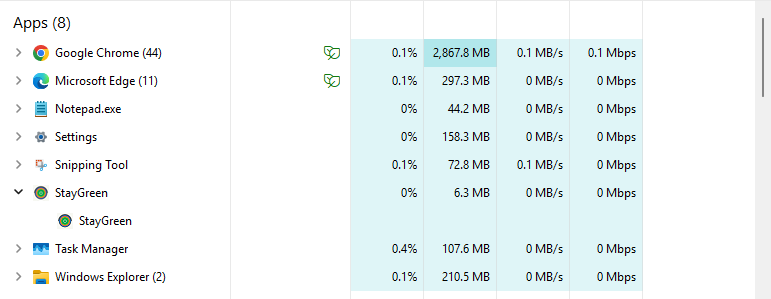
No polling timer. No fake cursor drift. No synthetic input loop. StayGreen uses Windows power-state signaling so the app can keep the system awake while typically reading around 0.0% CPU at idle in Task Manager.

Hardware Interlock

The keep-awake state auto-pauses when the charger is unplugged or the lid closes, so long sessions do not turn into accidental thermal or battery abuse.

Clamshell Mode Support

StayGreen automatically detects external-monitor setups and behaves correctly for docked or clamshell workflows where the internal panel should not dictate awake behavior.

Per-App Targeting

Scope the behavior to specific executables like ms-teams.exe so the keep-awake state only engages when the workflow actually needs it. That means less blanket override, more intentional control.

Engineering Proof

~0.0% CPU at idle · < 8 MB RAM

Direct Win32 signaling instead of background churn.

StayGreen asks Windows to stay awake through the native execution-state API—no fake mouse movement, no periodic wake pings, and no background loop burning cycles just to pretend the user is active.

For technical buyers, the operating system does the work while StayGreen sets the appropriate flags and gets out of the way. In idle tests, Task Manager reports roughly 0.0% CPU usage with a memory profile under 8 MB for the keep-awake path.

  • No polling loop required to maintain state
  • No synthetic input events to trigger EDR or policy suspicion
  • Cleaner fit for enterprise-managed workstations with restrictive sleep defaults

Measured idle proof

Screenshot evidence for the low-overhead runtime profile.

StayGreen benchmark proof showing about 0.0 percent CPU usage at idle and a low memory footprint

Product Interface

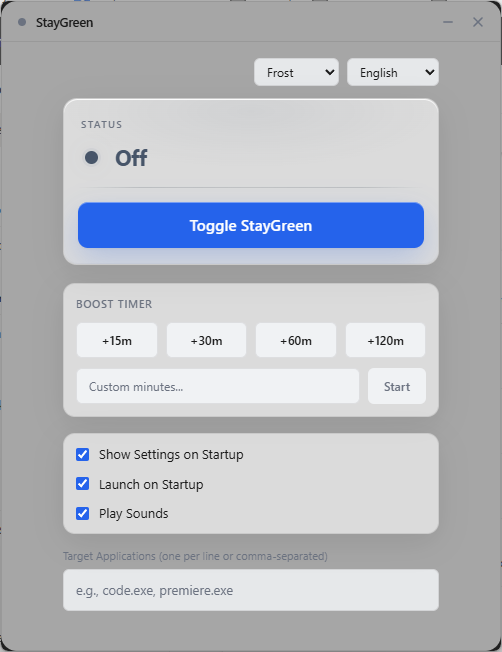
StayGreen interface in Frost theme (English) showing Premium Boost Timer and per-app targeting controls

A control panel built for intentional power-state overrides.

The StayGreen interface keeps the important decisions obvious: when to override sleep, how long to hold the state, and which app should trigger it. No command-line dance. No clutter disguised as enterprise UX.

Premium Boost Timer: Trigger a bounded keep-awake window for meetings, uploads, renders, or overnight monitoring without leaving the app enabled indefinitely.
Per-app targeting UI: Bind the behavior to foreground apps so the override becomes part of the workflow, not a blanket machine-wide hack.
Guardrail-first defaults: Laptop-aware conditions stay visible so the user understands when StayGreen will step back automatically.

Automata Labs Pricing Philosophy

Utility software should be owned, not rented.

StayGreen follows the same Automata Labs model as our other desktop products: one purchase, one binary, no SaaS tax attached to a local utility. Buy direct for $4.99 USD with a perpetual license.

No recurring subscription to keep your workstation awake
Pay once and keep the version you purchased forever
One-time pricing — no subscription to keep your workstation awake

Where It Fits

  • Keeping Teams, Slack, or remote-presence workflows active on managed corporate laptops
  • Preventing sleep during kiosk, monitoring, dashboard, or overnight workstation sessions
  • Overriding restrictive power-policy behavior without fake mouse jigglers or unsafe hacks

Practical guides for Windows keep-awake workflows

Learn when to use StayGreen for PowerToys Awake comparisons, caffeine-style alternatives, per-app targeting, long-running jobs, meetings, remote desktops, and low-overhead Windows 11 sleep prevention.

Browse StayGreen workflow guides or read StayGreen vs PowerToys Awake .

Technical specifications

Technical specifications for procurement

Spec Implementation
Data Sovereignty Sleep-prevention state is local; no remote presence or activity reporting
Telemetry Status None
Core Runtime Native Windows binary using SetThreadExecutionState / execution-state APIs
Network Requirements Fully functional offline
Deployment Compatibility Windows 10 and 11 (x64); direct purchase and Microsoft Store
System footprint Near-zero idle CPU; no polling loops or fake input injection
Hardware guardrails Auto-pause on battery unplug or lid close

Buy the utility once. Stop fighting Windows sleep every day.

StayGreen is for operators who want a direct keep-awake path, clear guardrails, and a desktop utility that costs less than a month of most SaaS subscriptions.

$4.99 USD — Perpetual License

One-time purchase · No subscription · Instant install via the Microsoft Store

Buy through the Microsoft Store—instant install, automatic updates, and a Microsoft receipt for easy expensing. No account needed on our site, and no subscription.

Review the Capabilities