Taskbar Sentinel: back up your pinned apps & restore your taskbar in one click — on the Microsoft Store.
Windows 10 & Windows 11

Unmask the lock. Finish the delete, rename, or save.

Tired of opaque “File in use” errors when you delete a folder, save a document, or clear a build output? LockGhost turns that deadlock into actionable intelligence—right where you already work—with native Explorer integration and resolutions you can execute in seconds instead of chasing phantom PIDs.

$3.99 USD One-time purchase · One-time purchase. No subscriptions. Local-first.
$3.99 USD — Perpetual License

One-time purchase · No subscription · Instant install via the Microsoft Store

Buy through the Microsoft Store—instant install, automatic updates, and a Microsoft receipt for easy expensing. No account needed on our site, and no subscription.

Installation & support Explore all utilities

explorer right‑click · offline lock history · one-time purchase

The fragile workflow

Forums, guesses, and “try closing OneDrive first” rarely scale when the clock is ticking.

When deletes fail—or Office and IDEs loop on saves—you need the specific locker: sync clients, indexer, Defender, orphaned handles, stray dev servers. Cycling Task Manager tabs without linkage wastes minutes and breeds risky “end random tasks” fixes.

The LockGhost workflow

Right‑click → see the locker → resolve with guardrails.

LockGhost aligns with Explorer habits: surface actionable process names quickly, classify severity visually, and use one‑click remediation when appropriate—instead of brute‑forcing guesses across background services.
Why teams adopt LockGhost

Built where file locks waste the most time

Instant visibility (sub‑50ms class of detection)

Powered by the Windows Restart Manager API, LockGhost is built to resolve locks quickly—so you spend less time wondering whether OneDrive sync, antivirus scans, indexing, stray dev watchers, or Explorer itself is pinning the handle.

Seamless native experience

Mica‑aware presentation, predictable system tray ergonomics, and customizable global hotkeys keep LockGhost out of your cognitive budget until Explorer throws another lock—not another mystery modal.

Safe, intentional resolutions

Friendly names beat opaque IDs. Color‑coded severity highlights escalation. One‑click End Process ships with safeguards that steer you away from terminating critical shells without friction when possible.

100% offline & privacy‑first

Data never leaves the machine—no telemetry conduit, no cloud sync mandate, no network calls for diagnosing locks. History and preferences persist in a local database on disk, aligned with workstation security reviews.

See it in action

From “file in use” to a name you can act on—in four steps.

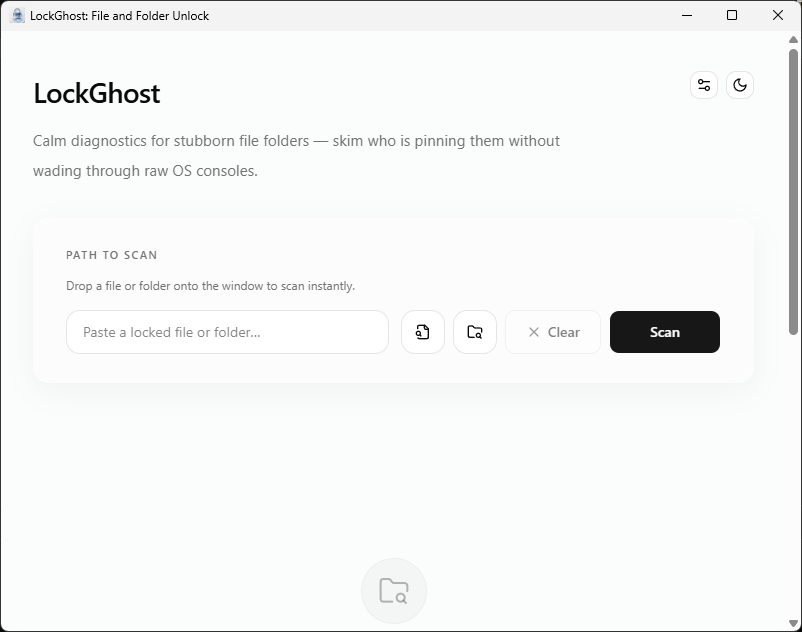
LockGhost main window on Windows 11 in light mode, with a single field to scan a locked file or folder.
One calm field, not a console. Paste, drag, or right-click a stubborn path and LockGhost scans it in place.
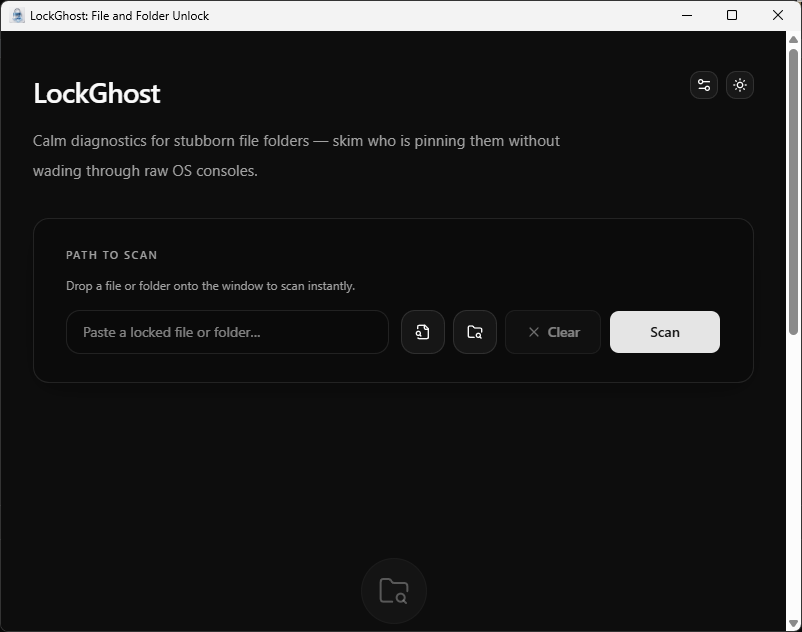
LockGhost main window in Mica-aware dark mode, matching the Windows 11 system theme.
Mica-aware dark mode that follows your Windows theme. The same one-field workflow, day or night.
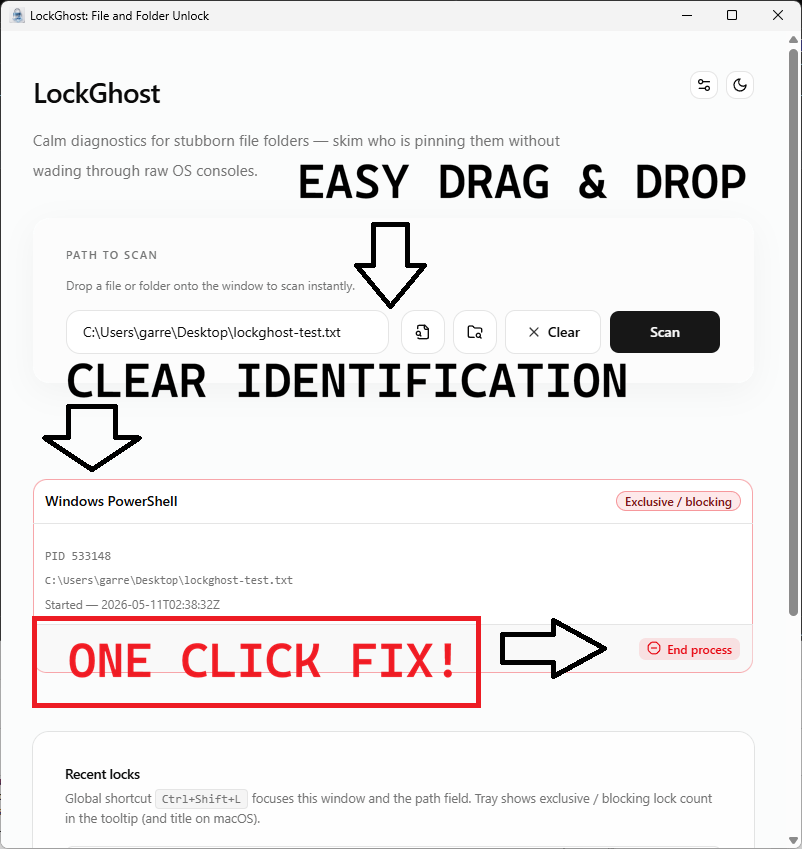
LockGhost showing the processes holding a file, each with a friendly name and color-coded lock severity.
The answer Windows never gives you: every process holding the path, by friendly name, with color-coded severity instead of cryptic PIDs.
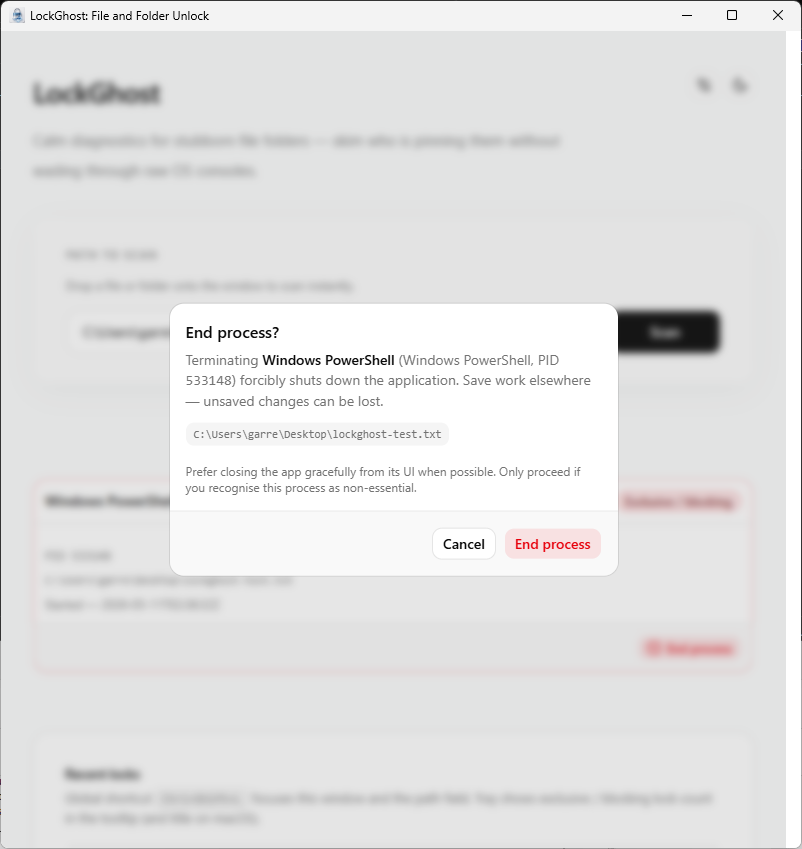
LockGhost confirmation dialog before ending a process that is locking a file, warning about unsaved work.
Guarded one-click resolution. LockGhost confirms before you end a process and hard-blocks critical system roles, so a stuck file never becomes a crashed machine.
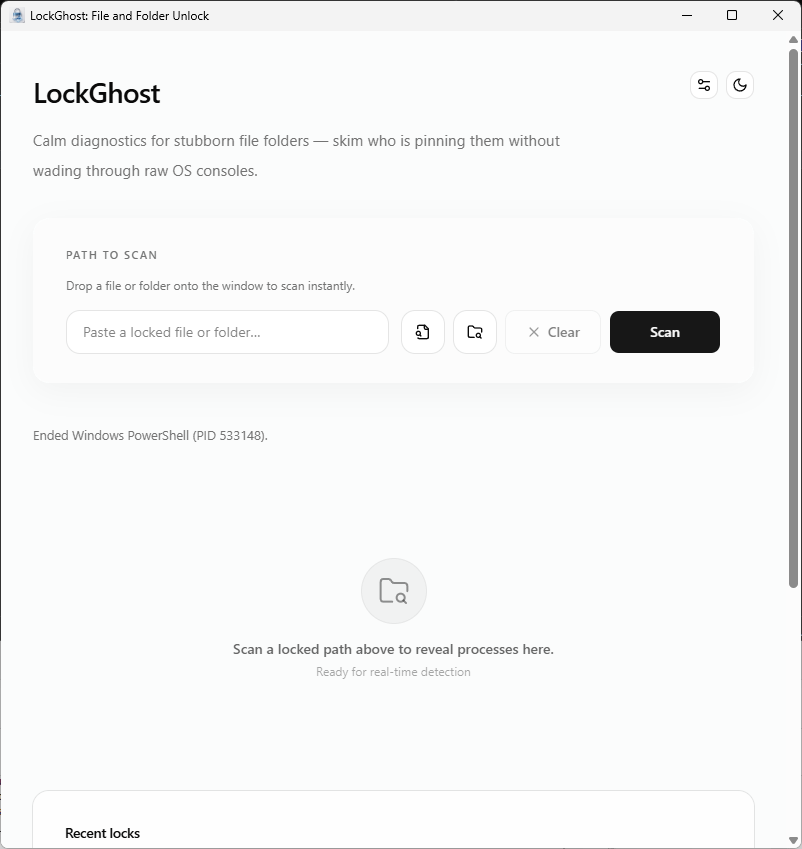
LockGhost showing a cleared path after the locking process was ended, ready to delete, rename, or save.
Lock cleared, path freed. Finish the delete, rename, or save you came to do—no reboot, no guesswork.
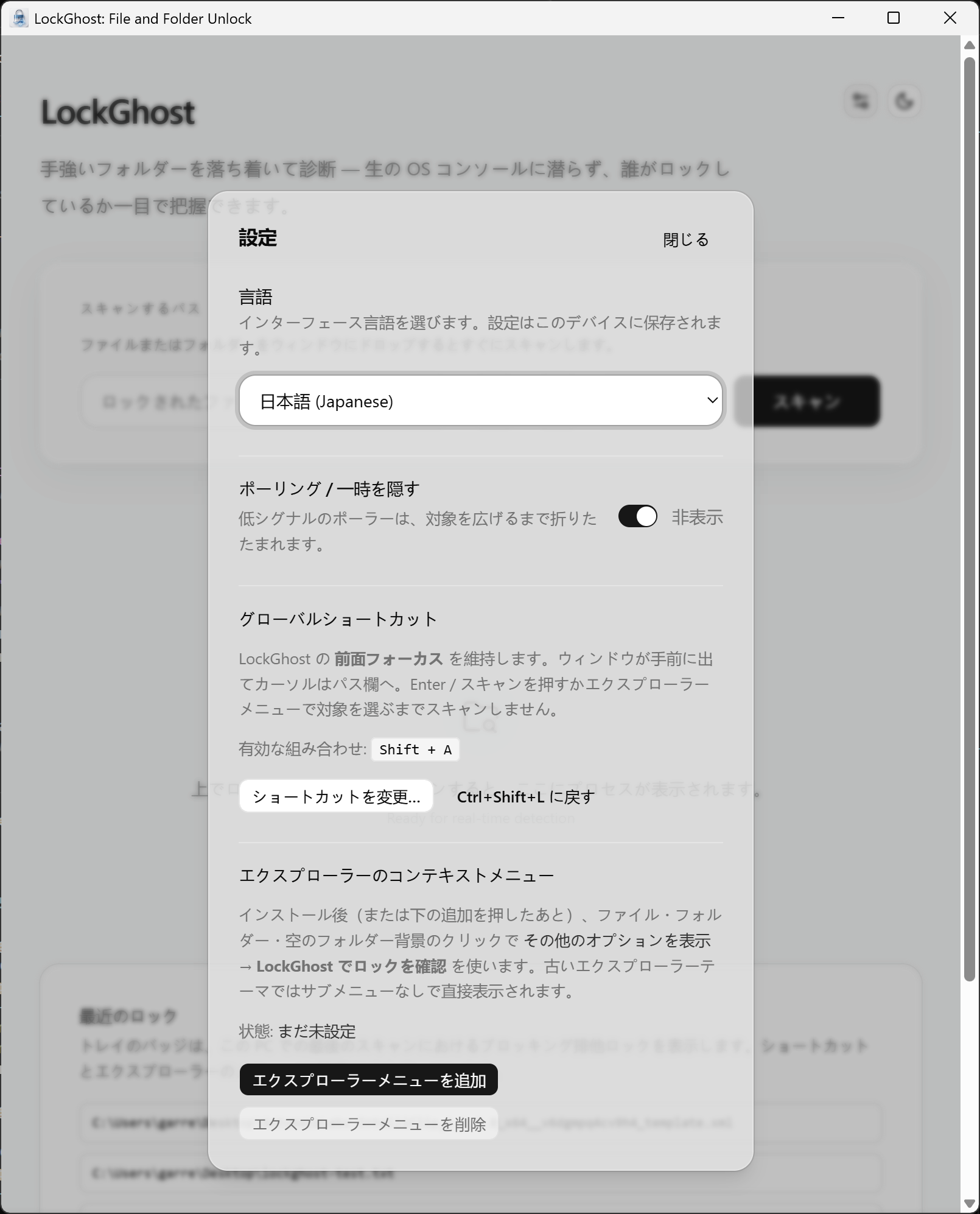
LockGhost settings panel localized into Japanese, with language, global hotkey, and Explorer menu options.
Settings in eleven languages (Japanese shown), with your own global hotkey and Explorer right-click menu. Localized end-to-end and fully offline.

From blocked paths to unstoppable workflows—for $3.99 USD once.

If file locks steal minutes from engineering, ops, accounting, or content pipelines, charging them to clarity pays for itself on the first escalation you avoid. LockGhost keeps the remediation surface local, fast, and explainable to whoever owns the workstation.

$3.99 USD — Perpetual License

One-time purchase · No subscription · Instant install via the Microsoft Store

Buy through the Microsoft Store—instant install, automatic updates, and a Microsoft receipt for easy expensing. No account needed on our site, and no subscription.

Ideal workloads

  • Unblocking deletes and renames when sync, search, or antivirus has the file open
  • Stopping “save failed” loops in Office, IDEs, or creative tools caused by hidden file locks
  • IT and power users diagnosing handle leaks without spelunking Task Manager on every ticket
  • Developers cleaning build outputs when test runners or watchers leave files pinned

FAQ

File locks, clarified

Why does Windows say “File in use” without naming the app?

Windows blocks unsafe deletes while handles are open. The stock error message often omits the actual process name. LockGhost bridges that gap by resolving locks through the Restart Manager API and translating results into human-readable process names and severity cues.

How is LockGhost different from Task Manager alone?

Task Manager lists processes; it does not connect a specific blocked file or folder to the exact locker in one step. LockGhost targets the “what is holding this path?” question from Explorer with quick detection and contextual actions.

Does LockGhost use a supported Windows API?

Yes. LockGhost is built around the official Windows Restart Manager API—the same class of infrastructure Windows uses to coordinate restart-aware installations and file usage discovery.

Is LockGhost safe for work machines and sensitive directories?

Diagnostics run locally. LockGhost does not upload paths, process lists, or telemetry to Automata Labs or third parties. Historical data stays in a local database on your disk.

What protects me when ending a process?

LockGhost emphasizes friendly names and severity coloring, and includes guardrails to reduce the chance of terminating critical system roles by mistake. You stay in control—but you should still end tasks deliberately.

Does LockGhost require an account or cloud sync?

No accounts are required for core operation. Marketing copy positions the app as offline-first with no cloud syncing and no outbound telemetry for lock analysis.

Still stuck? Email [email protected] after checking the Support Center.

Technical specifications

Technical specifications for procurement

Spec Implementation
Data Sovereignty Lock discovery and history stored in a local on-disk database; no cloud sync
Telemetry Status None; zero network calls in shipping builds
Core Runtime Native Windows utility using Restart Manager API and Explorer shell integration
Network Requirements Fully functional offline
Deployment Compatibility Windows 11 (Microsoft Store and direct purchase)
Detection Sub-50ms lock queries via Windows Restart Manager
Integration Explorer right-click context menu and system tray

Quit negotiating with unnamed locks.

Add LockGhost to your desktop troubleshooting stack—offline diagnostics, Restart Manager fidelity, Explorer-native ergonomics—and get back to shipping instead of spelunking Task Manager guesses.

$3.99 USD One-time purchase. No subscriptions. Local-first.

$3.99 USD — Perpetual License

One-time purchase · No subscription · Instant install via the Microsoft Store

Buy through the Microsoft Store—instant install, automatic updates, and a Microsoft receipt for easy expensing. No account needed on our site, and no subscription.

Browse catalog